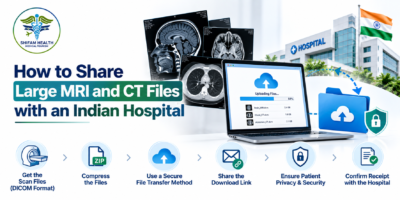




You have completed an MRI or CT scan, received the radiology report and contacted a hospital in India for a specialist opinion. The hospital now asks you to send the scan images. You open your phone or laptop, only to discover that the files are several gigabytes in size, the upload keeps failing, or you have no idea which folder contains the original study.
This is a common practical challenge when arranging a medical consultation across countries. An MRI or CT examination may contain hundreds or thousands of individual images, and the original files are often much larger than a typical PDF report. Sending the report alone may not be enough if the specialist needs to examine the images directly.
To send MRI and CT files to a hospital in India successfully, you need to confirm what the hospital requires, obtain the original imaging data, choose an approved transfer method and verify that the receiving team can open the files.
RadiologyInfo, a patient-information resource supported by the American College of Radiology and the Radiological Society of North America, explains that patients can obtain and share their medical images electronically or through physical storage media. Sharing previous images can help clinicians compare examinations and may avoid unnecessary repeat imaging. Read the guide to obtaining and sharing medical images.
In this guide, you will learn how to prepare large MRI and CT files, understand DICOM and ZIP formats, use secure transfer methods, avoid common mistakes and confirm that an Indian hospital has received the complete imaging study.
Why MRI and CT Files Can Be Difficult to Send

Before choosing a transfer method, it helps to understand what you are trying to send.
An imaging examination is not always a single photograph or document. A CT or MRI study may contain multiple image series, each representing a different acquisition, sequence or reconstruction. The number and size of files depend on the examination, the equipment and the imaging protocol.
For example, a study might include several anatomical views or sequences, while another may contain additional contrast-enhanced or specialised image series. The complete study may therefore be much larger than the written report.
Three separate items are particularly important:
| Item | What it contains | Why the hospital may need it |
|---|---|---|
| Radiology report | The radiologist’s written interpretation of the examination | Explains the reported findings and conclusions |
| Original imaging study | The actual MRI or CT image data, often in DICOM format | Allows clinicians to review the images, compare findings and assess relevant details |
| Medical summary and previous reports | Context about the patient’s diagnosis, symptoms and treatment history | Helps the specialist understand why the examination was performed and how it relates to the current clinical question |
These items complement one another. The report does not always replace the original images, and the images do not necessarily explain the full clinical history.
Ask the receiving hospital which components are required for your consultation. Some initial reviews may be possible using the report and selected records, while other cases require the complete imaging study.
What Is DICOM, and Why Does It Matter?
DICOM stands for Digital Imaging and Communications in Medicine. It is a widely used standard for storing, transmitting and managing medical imaging information.
DICOM files may contain image data along with information that helps identify the examination and its associated imaging series. Hospitals use compatible imaging systems to display and review these studies.
When an Indian hospital asks for your original MRI or CT scan, it may specifically request the DICOM study rather than screenshots, photographs or a PDF containing selected images.
What does a DICOM study usually look like?
Depending on how the imaging centre provides the examination, you might receive:
- A folder containing many files with a
.dcmextension. - A collection of image files accompanied by a viewer application.
- A ZIP archive containing the imaging folders.
- A download package from the imaging centre’s portal.
- A CD, DVD or USB drive containing the study.
Not every DICOM file necessarily has the .dcm extension, so do not assume that files without that suffix are automatically incorrect.
If the imaging centre supplies a viewer application, keep the original image data intact. The viewer may make it easier to open the study on a computer, but the receiving hospital may have its own imaging software and preferred import process.
Should you convert DICOM images into JPG or PDF?

Do not convert the entire study simply to make it easier to email.
A JPG image or PDF may be useful for a report, a selected image or an explanatory document, but it does not necessarily preserve the full imaging data and functionality of the original study.
For a formal specialist review, ask the hospital whether it needs the original DICOM data. Follow the hospital’s instructions rather than converting files into a format that may not be suitable for diagnostic review.
Step One: Contact the Indian Hospital Before Uploading Anything
The most efficient first step is to contact the receiving hospital’s relevant department or authorised international patient coordinator.
Do not immediately upload several gigabytes to an unfamiliar website. First establish who needs the files and how they should be delivered.
Ask the hospital:
- Does the specialist need the complete MRI or CT study, or is the written report sufficient for the initial review?
- Should I send the original DICOM files?
- Does the hospital have a secure upload portal or approved image-transfer service?
- What is the maximum file size for each upload?
- Can I send a ZIP archive, or should I upload the original folders separately?
- Does the hospital need the radiology report and previous scans as well?
- Is there a deadline or an access-expiry date for the transfer link?
- Whom should I contact if the upload fails?
These questions help you avoid spending time preparing files in a format the hospital cannot use.
Which department should receive the files?
The correct recipient depends on the reason for the consultation. The hospital may direct you to the relevant clinical department, radiology department, medical records team or an authorised coordinator.
If you are contacting the hospital through an international patient service, confirm that the person receiving the files is authorised to handle them and that the transfer method is approved.
For general hospital-selection advice, you can also read our guide on questions to ask before accepting a medical treatment package in India.
Step Two: Obtain the Original MRI or CT Files
If you only have a written report, contact the imaging centre where the scan was performed.
Explain that you need a copy of the original imaging study for review by another hospital. Ask how the centre provides images and whether it can supply them electronically.
Depending on the provider, you may be offered a secure download, a patient portal, a CD, a DVD or a USB drive.
If your scan is on a CD or DVD
- Use a computer with a compatible disc drive.
- Open the disc and locate the imaging folders.
- Check whether it contains the original study and any accompanying viewer.
- Copy the complete imaging folders to a secure location on your computer, if permitted and technically possible.
- Keep the folder structure intact.
- Do not delete or rename files individually unless the imaging centre or receiving hospital instructs you to do so.
Some discs include a viewer, reports and additional files. Avoid copying only the files that appear to be images if you are unsure which files form part of the original study.
If you cannot access the disc or copy the files, ask the imaging centre for an electronic copy or instructions.
If you have only the radiology report
The report is still useful. Send it to the hospital if requested, but explain that you do not yet have the original image files.
Ask whether the specialist can begin the initial review using the available records or whether the imaging centre must supply the complete study first.
Do not delay an urgent medical assessment while trying to retrieve an old scan. If your condition requires prompt attention, seek appropriate medical care and explain what records are currently available.
Step Three: Check the Files Before Sending Them
Before uploading a large imaging study, confirm that you have the correct examination and that the files appear complete.
Use this simple checklist:
- The patient details correspond to the intended patient.
- The scan date is correct.
- The examination type is identified, such as MRI or CT.
- The correct body area is included.
- The original image folders are present.
- The radiology report is available, if one was issued.
- The files can be accessed from your computer or the supplied viewer.
- You have not accidentally selected only a few screenshots instead of the complete study.
If the imaging centre has supplied more than one study, organise them separately.
For example:
Medical_Imaging/
├── 2026-02-14_MRI_Brain/
│   ├── Original_Images/
│   └── Radiology_Report.pdf
├── 2026-03-02_CT_Chest/
│   ├── Original_Images/
│   └── Radiology_Report.pdf
└── Imaging_Index.pdf
This is an example folder structure, not a requirement for every hospital. Keep the original imaging files and folders unchanged unless the receiving provider specifies otherwise.
Create a simple imaging index
A short index can help the receiving team identify each study without opening every folder.
| Scan date | Examination | Body area | Report included? |
|---|---|---|---|
| 14 February 2026 | MRI | Brain | Yes |
| 2 March 2026 | CT | Chest | Yes |
Use the actual examination dates and details from your records. Do not guess if a date is unclear.
If you have previous scans, include their dates where relevant. Comparing examinations over time can help clinicians assess changes, although the need for comparison depends on the clinical question.
Step Four: Choose the Right Way to Send Large MRI and CT Files

There is no single transfer method suitable for every hospital. The correct option depends on the hospital’s systems, file size, privacy requirements and the type of imaging data.
Method 1: Hospital patient portal or secure upload service
Best option when the receiving hospital provides one.
Some hospitals allow patients or authorised healthcare providers to transfer imaging through a secure online system.
The process may look like this:
- Obtain the official upload link or portal instructions from the hospital.
- Sign in or complete the required verification.
- Select the correct imaging study or upload the requested archive.
- Follow the file-size and format instructions.
- Wait for the upload to complete.
- Save the confirmation or reference number, if provided.
- Ask the hospital to confirm that the images are accessible.
An upload reaching 100% does not necessarily prove that the clinical team can open the study. Technical import or compatibility problems may still occur.
Method 2: Hospital-approved cloud or image-sharing link
Some imaging providers and hospitals support electronic sharing through a secure link.
Before using one, confirm that the service is approved by the receiving hospital. Check who can access the files, whether a password is required, whether the link expires and how long the study will remain available.
If the hospital sends you a link, follow its instructions rather than creating an account on an unrelated website.
If you are given a temporary link, send the files early enough for the hospital to access them before the consultation. Ask for confirmation that the study has been received and can be opened.
Method 3: ZIP archive
A ZIP file groups multiple files and folders into a single archive. This can make it easier to upload a large imaging study when the hospital accepts archives.
However, ZIP compression does not guarantee a dramatic reduction in file size. Some medical imaging data is already compressed or may not compress much further.
To prepare an archive:
- Select the complete imaging folder, not a handful of individual files.
- Use your computer’s standard ZIP tool to create an archive.
- Give it a descriptive filename, such as
2026-03-02_CT_Chest.zip. - Check the resulting file size.
- If practical, test whether the archive opens correctly.
- Confirm that the hospital accepts ZIP files before uploading.
Do not remove files simply to reduce the archive size. If the archive remains too large, ask the hospital which transfer method it recommends.
Method 4: Split archives or multiple uploads
Some systems have strict upload limits. If the hospital permits multiple uploads, it may be possible to divide the transfer into separate parts or upload individual studies separately.
Do not split a DICOM series arbitrarily without checking the hospital’s instructions. The receiving team needs to be able to identify and reconstruct the intended study.
If the hospital permits multiple files, label each upload clearly and provide an index explaining which examinations are included.
Method 5: CD, DVD or USB drive
Physical media can be useful when electronic transfer is unavailable or the hospital specifically requests it.
Before sending a disc or drive, ask:
- Which media types are accepted?
- Does the hospital require DICOM files or a specific export format?
- Should the drive contain only the requested studies?
- What patient-identification details should accompany the media?
- How should the package be delivered?
- Will the media be returned?
Use a reputable, trackable delivery service if physical media must be couriered. Keep a copy of the records and avoid sending your only copy.
RadiologyInfo explains that medical images may be supplied on physical media or transferred electronically, depending on the provider’s capabilities. Read the patient guide.
Which transfer method should you use?
| Method | Main advantage | Important limitation |
|---|---|---|
| Hospital secure portal | Uses the hospital’s designated process | Upload limits and supported formats vary |
| Approved image-sharing service | May support large imaging studies | Recipient access, expiry and compatibility must be checked |
| ZIP archive | Groups many files into one upload | May not reduce the size significantly |
| Multiple uploads | Can accommodate some upload limits | Requires careful labelling and confirmation of completeness |
| CD, DVD or USB | Useful when electronic transfer is unavailable | Requires physical delivery and compatible access |
My recommendation: Start with the receiving hospital’s approved portal or image-transfer instructions. Choose another method only after the hospital confirms it can accept the files that way.
What If the MRI or CT File Is Too Large to Upload?
If an upload fails, avoid repeatedly trying the same method without identifying the cause.
The problem could be a file-size limit, an unstable internet connection, a browser issue, an incomplete archive or a restriction imposed by the hospital’s portal.
Try the following steps.
Check the maximum upload size
Find out whether the system limits each file, each upload session or the total amount of data.
A 3 GB study might be accepted by one service but rejected by another. Do not assume that a service supporting large documents will also support a complete imaging examination.
Check your internet connection
A large upload may take a considerable amount of time. If possible, use a reliable connection and avoid closing the browser or shutting down the computer while the transfer is in progress.
If the upload repeatedly stops, ask whether the hospital’s system supports resuming interrupted transfers.
Ask whether the hospital accepts a different transfer route
The hospital may be able to provide another upload method or arrange transfer directly from the imaging centre.
Do not upload sensitive medical information to a random file-sharing website just because it accepts large files. Confirm the recipient and security arrangements first.
Do not remove original images to make the file smaller
Deleting image series, converting the study into screenshots or reducing image quality may leave the receiving specialist without the information needed for review.
If the study is too large, ask the imaging centre or hospital how to transfer it properly.
Can You Send MRI and CT Files Through Email or WhatsApp?
This depends on the file size, the platform and the receiving hospital’s instructions.
Email can be useful for sending a written radiology report or a small set of documents when the hospital accepts that method. However, email attachment limits often make it unsuitable for complete imaging studies.
Messaging applications can be convenient for coordination, but they should not automatically be treated as appropriate channels for transferring original diagnostic images. A service may restrict attachment sizes, alter media or lack the viewing and transfer workflow required by the hospital.
A screenshot or compressed preview may be helpful for explaining which examination you mean, but it is not a substitute for the original imaging study when the specialist requires it.
Before using email or a messaging application, confirm:
- Whether the hospital accepts that channel.
- Whether the complete imaging data can be sent.
- Whether the files will retain the required format.
- Whether the recipient is authorised to receive the records.
- Whether a more secure, hospital-approved transfer option is available.
The US Office of the National Coordinator for Health Information Technology describes several ways records can be delivered, including patient portals, direct uploads and physical media, and advises patients to check which methods their provider supports. Read the ONC guidance.
How to Protect Your Medical Files When Sharing Them Internationally
MRI and CT files may contain patient-identifying information. Protecting them is part of preparing a responsible transfer.
Verify the recipient
Use the official contact details supplied by the hospital or a verified authorised coordinator. If you receive an unexpected link or payment request, confirm it independently before uploading or responding.
Use access-controlled sharing
Where available, use the hospital’s approved secure portal or a service with suitable access controls. If a password-protected file is requested, share the password through a separate appropriate channel rather than including it in the same message.
Check permissions and link expiry
For cloud links, confirm who can open the study and how long access will remain available. Avoid public links that anyone can access.
If the link expires before the specialist reviews the images, ask the hospital to arrange renewed access.
Share only what is needed
Send the imaging studies and related documents requested for the consultation. Do not publish identifiable medical files in public folders, forums or open links.
If you are sharing a family member’s records, make sure you have the necessary permission or authority.
Keep your own copy
Retain the original images, reports and a record of where you sent them. This can help if the hospital needs another transfer or if you seek an opinion from another specialist.
The ONC also provides general guidance on keeping personal health information private and secure. Read its privacy and security resource.
How to Confirm That the Hospital Has Received the Complete Study
Do not assume the process is finished simply because you have sent a link or received an automated upload notification.
The receiving team may still need to download the study, import it into its imaging system or resolve a file-format issue.
After sending the files, contact the designated recipient and ask for confirmation of the following:
- The files have arrived.
- The correct patient and examination have been identified.
- The complete study is accessible.
- The radiology report and any relevant previous studies are available.
- The specialist can access the files before the consultation.
If the hospital reports a problem, ask for a specific explanation. It may need the original DICOM data rather than a PDF, the missing image series, a different archive format or a new upload link.
If the files cannot be opened, return to the imaging centre for help rather than repeatedly converting or modifying the originals yourself.
Common Mistakes to Avoid
| Mistake | Why it causes problems | Better approach |
|---|---|---|
| Sending only screenshots | They may not preserve the full imaging study or necessary detail | Ask whether the complete original study is required |
| Sending only the written report | The specialist may need to examine the images directly | Send the report and original images when requested |
| Uploading to an unverified website | Patient information may be exposed to an unintended recipient | Use a hospital-approved transfer method |
| Renaming or deleting files inside the original study | Important information or relationships between files may be lost | Keep the original folder intact |
| Compressing the files repeatedly | It may not reduce the size meaningfully and can create extra work | Check the size and ask the hospital about its preferred method |
| Sending an expired link | The specialist may be unable to access the study | Confirm the link’s expiry and allow time for review |
| Assuming the upload notification means the study is usable | The files may not have imported or opened correctly | Ask the receiving team to confirm accessibility |
| Sending several scans without dates or labels | The recipient may struggle to identify the correct examination | Prepare a simple imaging index |
| Deleting the original files after sending | You may need to send them again or obtain another copy | Keep a secure backup |
When Should You Contact the Hospital or Imaging Centre?
Contact the receiving hospital before sending the files if you do not know the accepted format, upload limit, authorised recipient or preferred transfer method.
Contact the imaging centre if:
- You have only the written report and need the original study.
- The disc or download does not open.
- Some image folders appear to be missing.
- You are unsure whether the export contains the complete examination.
- The hospital says the files are not in an accepted format.
- You need a new copy of an older scan.
If the specialist has requested additional images or reports, ask exactly which examination and date are required before requesting another copy.
Do not repeat an MRI or CT scan simply because the original files are difficult to transfer. Ask the treating clinician whether the existing study can be obtained and used first. Whether new imaging is clinically necessary is a decision for the qualified healthcare team.
If you have urgent or worsening symptoms, seek appropriate local medical care rather than waiting for a remote review or a file-transfer problem to be resolved.
A Practical Checklist Before You Send MRI or CT Files to India

Use this checklist before sharing your imaging study.
- I have confirmed the correct hospital, department and recipient.
- I know whether the hospital requires the report, original images or both.
- I have obtained the original imaging study from the imaging centre.
- I have confirmed the scan date, examination type and patient details.
- I have kept the original folder structure intact.
- I have prepared a clear filename or index for each examination.
- I know the accepted format and upload-size limit.
- I am using a transfer method approved by the receiving hospital.
- I have checked the link’s access permissions and expiry date, if applicable.
- I have retained a secure copy of the original files.
- I have sent the relevant radiology report and previous studies where requested.
- I have asked the receiving team to confirm that the complete study is accessible.
If you cannot tick every item, ask the hospital for guidance rather than guessing.
How Shifam Health Can Help You Coordinate a Specialist Review in India
For international patients, sharing imaging files is often one part of arranging a specialist consultation. You may also need to organise medical reports, explain your clinical concern, identify the relevant hospital department and clarify which additional documents are required.
Shifam Health supports international patients with hospital and doctor coordination and related treatment-planning arrangements in India. If you are considering a specialist review, you can discuss your requirements and ask about the process for sharing the medical information needed for coordination.
The receiving hospital or specialist should confirm the required imaging format, transfer method and clinical documents. Shifam Health’s coordination support does not replace a medical assessment or guarantee a particular treatment recommendation.
You can request a free consultation with Shifam Health to discuss the next steps for exploring treatment in India.
Frequently Asked Questions
How can I send large MRI and CT files to a hospital in India?
Ask the hospital about its preferred transfer method, such as a secure portal, approved cloud service or physical media.
What format should I use to send MRI or CT scans?
Hospitals often request the original DICOM files. Confirm the required format before converting or compressing files.
Can I send an MRI or CT scan as a PDF?
A PDF may contain the radiology report or selected images, but not the complete original scan. Ask whether DICOM files are needed.
What if my MRI or CT files are too large to upload?
Check upload limits and ask about large-file transfers, approved cloud sharing or alternative transfer methods. Keep the original files intact.
Is it safe to send MRI and CT files through WhatsApp?
Use WhatsApp only if the receiving provider approves it. Prefer the hospital’s secure transfer method for sensitive medical records.
What is the difference between DICOM files and a radiology report?
DICOM files contain medical imaging data, while the radiology report provides the written interpretation. Specialists may need both.
Can I use Google Drive to send MRI or CT scans?
Only if the hospital accepts it. Restrict access, verify the recipient and avoid public sharing links.
Should I send previous MRI or CT scans?
Previous scans may help specialists compare changes over time. Ask which studies and dates are relevant.
How can I confirm the hospital received my complete scan?
Request confirmation that the files are accessible and complete. Contact the imaging centre if anything is missing.
Conclusion
Sending large MRI and CT files to an Indian hospital is easier when you confirm the requirements before uploading anything. Obtain the original imaging study, keep the folder structure intact, choose a transfer method accepted by the hospital and send the radiology report alongside the images when requested.
Most importantly, verify that the receiving team can open the complete study before your consultation. An upload confirmation alone does not establish that the specialist has everything needed for review.
If you are preparing for a specialist consultation in India, organise your imaging and medical reports early, retain your original files and ask for help when the required format or transfer process is unclear.
For assistance with coordinating a specialist consultation and understanding the next steps for treatment planning in India, contact Shifam Health for a free consultation.